Showing posts with label Arduino Due. Show all posts

Friday, 7 August 2015

New Duet Electronics - Version 0.8.5

RepRap 3D printers with multiple extruders are becoming increasingly common however the majority tend to have dual extruders rather than 3 or more. Released in December 2013, the Duet 0.6 is now an established 32bit 3d printing electronics solution that has proven to be popular and versatile. With this in mind we decided to extend the Duet 0.6 to support two extruders on one board and developed the Duet 0.8.5.

The new features are highlighted below and importantly it features the same expansion header as the Duet 0.6 so it supports a Duex4 expansion boardA Duet 0.8.5 + a Duex4 gives support for 6 extruders. That's 9 stepper channels and 7 heater channels including the heated bed!

Duet V0.8.5 (picture updated 20160111 to show polarised pin headers)

We should thank David Crocker (DC42 on the RepRap forums) upfront for his helpful advice in the development of the Duet 0.8.5.

New Features in Duet 0.85

  • A second extruder channel (E1).
  • A second PWM fan output.
  • E1 motor current controlled by the SAM3X8E DAC0 channel. Thanks to David Crocker for this idea.
  • Two "always on" fan pins.
  • Dedicated header for the PanelDue.
  • Dedicated probe header, supports many different probes including David Crocker's mini IR probe.
  • Additional pins accessed on the SAM3X8E processor to enable the new features.


Improvements from 0.6

  • Lower noise components and circuit layout used for the 5V BUCK circuit.
  • Complete ground plane - reduce noise and potential ground loops.
  • Switches and power indication LEDS moved to the same edge as the SD/USB/Ethernet for simpler access and indication.
  • VSSA now present on the expansion header. This combined with the changes to the Duex4 0.2a mean that analogue ground is now used for all 7 temperature measurement channels.


Other Changes

Not necessarily improvements but changes to simplify the board or reduce component count:
  • USB is now a simple USB 2.0 device, rather than a Host/Device as before. This was never used on the 0.6 and removing it reduces component count.
  • Removed the IDC headers for the heatbed and motor/hotend wiring loom. The footprints took up valuable board space and I am not aware of a printer that used a complex loom terminated in a single IDC.
  • The FAN MOSFETs are now PMV40UN2R FETs which are lower power but more than adequate for fans and other lower current devices. They also don't use a second mosfet to increase turn on voltage, like in the 0.6 design, as that was overkill. This means they are inverting (use M106 I1 to change)
  • Extruder thermistor headers and fan headers moved towards the middle of the board to allow for the same board size as the Duet 0.6 to be used.
  • In order to support a 7th heater channel (Extruder 6) along with two PWM fans the PWM pin had to be shared. This means that you can't run 6 extruders AND 2 PWM fans at the same time.

Board Connections

Duet 0.8.5 Connections


The expansion header pins have changed slightly as shown in the picture below:


Duet 0.8.5 Expansion header pins back view
The pins on the Duex 0.6 that went to the extruder E1 on the Duex4 have been diverted to E1 on the Duet 0.8.5. New pins now go to E5 in place of E1 on the Duex4


Opensource Hardware

In the same manner as the Duet 0.6 the Duet is based on the Arduino Due, and the KiCAD source files are released under the CERN OHL 1.2 license, which means you are free to modify them and distribute products based on them, as long as you share your modifications under the same license. We believe this is a much more appropriate license for Open Hardware than a Creative Commons/GPL or other licence based around copyright.

The Duet 0.8.5 source files are available on GitHub so feel free to fork the project and modify away!

Duet 0.8.5 developed with the Open Source KiCAD EDA suite


KiCAD has continued to improve since I started to develop hardware over 2 years ago. It is a powerful, Open Source design suite which means that the source files for the Duet are open for anyone to use and so is the software needed to modify them.

Firmware & Webinterface

The Duet 0.8.5 runs RepRapFirmware, the linked github page has the Think3dPrint3d latest version based on David Crocker's fork. I have made the changes required to support the additional pins, extruder multiple PWM fans and hopefully this will be merged into David's fork shortly.

The firmware has also improved substantially since the Duet 0.6. The majority of these improvements Think3dprint3d can take no credit for as they are the work of the RepRap community.

David Crocker has done excellent work in optimising the firmware and implementing segmentation free support for Delta printers. Old-style firmwares rely on segmentation to calculate movement but this can add printing artefacts. On David's fork the delta transform is calculated for each step, i.e. it's segmentation free, and thus the quality is higher. This is only possible due to the higher processing speed of 32 bit electronics.

Christian Hammacher (on the RepRap forums as zombiepantslol) has done a fantastic job continuing to improve the web interface:

Updated RepRapFirmware Web Interface with 6 extruders - Large Screen (PC) view
I am now also using the webinterface from my mobile, here are a couple of screenshots of that:

RepRapFirmware Web Interface on Mobile

RepRapFirmware Web Interface on Mobile - Print page


Production & Availability

The Duet 0.8.5 boards are being produced for us in the UK by a local electronics manufacturer. The first batch is finished and available on our website:


Also available as a bundle with the Duex4, and I will be very excited to see someone using all 6 extruders!


Saturday, 19 July 2014

Duet, 20x4 LCD screen and SD card.

Although the Duet communicates over Wifi and I can connect to it with a web browser on my phone, I still get many requests for a LCD based controller. I agree that being able to use a simple controller for quick, common functions is a good idea, things like homing the printer, preheating, starting a print etc. Think3dPrint3d have been providing controllers for older electronics that do this since we started, first with the Panelolu then with the Panelolu2 so it's time to port this to the Duet.

I decided to keep it simple to start with, so rather than get the Panelolu2 working, which would require I2C and headaches with 3.3V and 5V logic, I started with the PanelOne, a very basic LCD, Encoder, SD card combination which we are using on our Kossel Mini Kits.

Using a 5V LCD with 3.3V Microprocessor

This was the first hurdle to overcome. The HD44780 standard that these character LCD displays work on states 2.7 to 5V should work fine for the logic signals, however the LCD screens incorporating these chips are a lot more restrictive: 4.8-5.2V for the logic signals. Given the conflicting information I decided to modify a PanelOne prototype board by hand and give it a go. The key is to keep the logic signals separate from the backlight voltages. The schematic is below:


The major change is the addition of the "VCC" power into pin 2 of the LCD from pin 8 of header P1. Previously this was a straight 5V, now this should be able to be either 5V or 3.3V depending on the logic of the Microprocessor we are interfacing with. I connected this up and edited the "Hello World" sketch within Arduino 1.5.7 (1.5.6 r2 works as well) to use the following pin definitions:
/*
                            Arduino pin number  Duet Pin Name  Expansion header pin
 * LCD RS pin to digital pin D67                 PB16          (32)
 * LCD Enable pin to digital D23                 PA14          (10)
 * LCD D4 pin to digital pin D19                 PA10 RXD0     (14)
 * LCD D5 pin to digital pin D18                 PA11 TXD0     (13)
 * LCD D6 pin to digital pin D17                 PA12 RXD1     (12)
 * LCD D7 pin to digital pin D16                 PA13 TXD1     (11)
*/
LiquidCrystal lcd(67, 23, 19, 18, 17, 16);

Happily this worked!


I tested this with two other LCDs (old generic ones off eBay) and it worked with them as well. However as it's outside the guidelines of the LCD manufacturer's datasheets there is no guarantee that all types of HD44780 character LCDS will work in the same way.

Reading an SD card over SPI

The Duet's build in SD card supports SD2.0 and uses a 4 bit HSMCI interface. However it is often convenient to use an SD card reader mounted next to the screen, so I want to support SD over SPI which is how older 3D printer electronics and hardware interface with SD cards. The Arduino environment has a simple SPI SD library that worked straight away. The only customisation required is to make sure SD.Begin() uses the correct CS pin:

SD.begin(77);

For this example I used the SPI0_NPCS0 pin which is arduino digital pin 77. I combined the listfiles example sketch with the LCD display to list the first 4 files on a SD card:


The code (an adaptation of the listfiles example sketch):


#include <SPI.h>
#include <SD.h>
#include <LiquidCrystal.h>

File root;
// initialize the library with the numbers of the interface pins

LiquidCrystal lcd(67, 23, 19, 18, 17, 16); //RS,E,D4,D5,D6,D7

void setup()
{
  lcd.begin(20, 4);
  lcd.print("Reading Files...");
  delay(2000); //delay or else the message will not be displayed

  if (!SD.begin(77)) {
    lcd.clear();
    lcd.print("initialization");
    lcd.setCursor(0,1);
    lcd.print("failed!");
    return;
  }
   lcd.clear();
   lcd.print("initialization done");
   delay(2000); //delay or else the message will not be displayed
   lcd.clear();
   lcd.print("listing 4 files");
   delay(2000); //delay or else the message will not be displayed
   root = SD.open("/");
   lcd.clear();
   printDirectory(root, 0);
}

void printDirectory(File dir, int numTabs) {
  int row=0;
   while(true) {
     if(row>3) return;
     lcd.setCursor(0,row);
     File entry =  dir.openNextFile();
     if (! entry) {// no more files
       break;
     }
     for (uint8_t i=0; i<numTabs; i++) {
       lcd.print(' ');
     }
     lcd.print(entry.name());
     if (entry.isDirectory()) {
       lcd.print("/");
       printDirectory(entry, numTabs+1);
       row++;
     } else {
       // files have sizes, directories do not
       lcd.print("  ");
       lcd.print(entry.size(), DEC);
       row++;
     }
     entry.close();
   }

}

This sketch, and the adapted Kicad schematic are all on the Think3dPrint3d github.

Next...

I will test more LCD screens and hopefully will be able to get the next batch of PanelOnes compatible with both 3.3V and 5V.

The big job will be to port and adapt the Marlin menu system to RepRap Firmware. If anyone wants to assist with this project then drop me a line and I may be able to help with some hardware (duet board + LCD screen).

Monday, 31 March 2014

Setting up Eclipse for Arduino Due to allow for compilation and upload of RepRap Firmware on the Duet

UPDATE: Have a look at the comments below- Jantje, the author of the Arduino plugin for eclipse has posted some updated advice, the key piece being:
First of all I advice "people not using eclipse already" to use the Product version. This is one install that includes eclipse and the plugin. You can find a download link for your os here: http://eclipse.baeyens.it/download.php. I advise to us the latest version. Mac users must install the latest version due to a change in arduino folder policy on mac.
This is a guide to installing and configuring the Eclipse environment on Windows in order to modify and compile the RepRap Firmware for Duet electronics. It may be generally useful for getting Eclipse to play nicely with the Arduino Due board as well.

Note that many printer settings can be changed in g-code within the RepRap firmware and you may not need to edit and compile a new firmware binary to run the RepRap firmware on your printer.

This guide draws from a number of sources: Adrian's initial guide, 3D-ES's post on the RepRap forum and personal experience. I would really appreciate comments and feedback on how this works on other versions of Windows. If anyone is able to do a similar guide for Mac/Linux that would be greatly appreciated.

Installation


32 Bit. Throughout this guide I have stuck with using the 32bit version of Eclipse. This should work in more situations than the 64 bit version however let me know if you are successful with the 64 bit versions.

Paths. To keep it simple I have used C:\arduino, C:\eclipse and C:\workspace\RepRapFirmware as directory paths in this example - other paths should work but ensure you substitute the new paths in the instructions below.

Install Arduino: download 1.5.6-rc2, Extract and move to C:\arduino

Install Eclipse: download Juno C/C++ SR2. Extract and move into C:\eclipse

Create workspace: make directories:  C:\workspace,  C:\workspace\RepRapFirmware and C:\workspace\RepRapFirmware\Libraries

Run Eclipse: C:\eclipse\eclipse.exe. When prompted for the workspace enter C:\workspace and choose not to be prompted again. Close the welcome help window.

Install the Arduino Eclipse plugin: Select the Help Menu, Install new software. Paste http://www.baeyens.it/eclipse/V2 in the "work with" field and click "Add". It will prompt you to name the repository, use "Arduino Plugin". Uncheck "Group items by category" checkbox then select "Arduino eclipse extensions" item. Click through Next a few times then accept the agreement and finish. Yes to unsigned content, then restart Eclipse.


Setup the Arduino Eclipse plugin:  Select Window menu, "Preferences",  "General",  "Workspace" Check "Save automatically before build". Then click "Arduino" and enter C:\arduino  in the Arduino IDE path and C:\workspace\RepRapFirmware\Libraries in the Arduino Library path. Apply the changes.

Note the "bossac" port number: With your Duet board plugged into USB (but not 12V) press the "erase" button (next to the ethernet port), then the reset button (next to the USB port). If you have not done this before on your PC it may start to install the driver for the native USB port. One this is done go to Control Panel, Devices and Printers and you will see the native USB port. For some reason Windows thinks this is a GPS camera for me:


This shows the port as COM8, note this for the next step

Setup the RepRap Firmware project: Select Arduino menu, "New Sketch". Set the project name to "RepRapFirmware". go next then select C:\arduino\hardware\arduino\sam\boards.txt and select Arduino Due (Native USB Port) as the board.
             NOTE the Arduino Due (Programming Port) will not work with the Duet. 
Set the port to "COM8" or whatever you found in the previous step.
Exit Eclipse

Get the RepRap Firmware source:  Get the version of RepRapFirmware you want to work with. Good options are:

The choice depends on what you are using the firmware for, and you can change to a different branch later. Whichever version you choose, click "Download ZIP" button on the right side of the page and copy the contents of the zip file into  C:\workspace\RepRapFirmware
Only overwrite "RepRapFirmware.cpp" and "RepRapFirmware.h" do not overwrite the other files.


Copy the Libraries: Download the Libraries (click download zip on the right hand side). Copy the sub directories of "Arduino-libraries-master" into the C:\workspace\RepRapFirmware\Libraries\
directory. Next copy C:\arduino\hardware\arduino\sam\libraries\Wire
to C:\workspace\RepRapFirmware\Libraries\

Setup the Paths: Open eclipse, in the Project Explorer window on the left click on the "RepRapFirmware" project and select refresh. All the source files should now appear in the project explorer tree. Next right click on the RepRapFirmware project again and select properties. Navigate to C/C++ General, Paths and Symbols:


the core and variant entries will already be there, add the rest making sure you select "Is a workspace path" and "Add to all languages":


Except the "C:\arduino\hardware\arduino\sam\system\libsam\include" path which needs to be added as a filesystem path:


Note If using the Dc42 version on the firmware you must add the "flash" directory as well:


Once they are all added click apply, choose to rebuild the index and select OK to close the window.

Eclipse is now setup and ready to compile the firmware.

Compiling RepRap Firmware: The compilation output is visible on the console tab selected at the bottom center. Choose the Project menu, clean, clean all, OK. Then click on the green tick to "Verify", ie compile the code.

The progress of the compilation will show in the console window and when complete there will output something like this:


Uploading the Firmware: With the Duet plugged into USB if you have not erased the loaded firmware click the erase button, then the reset button on the Duet. Then click the green arrow on the toolbar "Upload Sketch". The upload will start, shoose "always run in background". In the console windown the upload progress and then the verify progress will be shown:


The compiles firmware is now uploaded to the Duet board. Note if you look in devices and printers the port will have changed to the Arduino Due port:


With a different com port, this is the one you use in Pronterface to talk to the firmware over USB.

Firmware Modification


Detailed information modifying the firmware is outside the scope of this blog post. Printer configuration defaults are in Platform.h:


The screenshot above shows part of the platform.h for the Multi Extruder branch which defines all 8 channels for the Duet and Duex4.

I hope this post has been useful!

Thursday, 16 January 2014

Duet on board power supply testing

There have been a number of discussions on the reprap forum (1,2,3 for starters) about the effect of electrical noise causing hanging/freezing on the Duet board requiring reset attributed to this. Radian originally highlighted that a significant spike on the 12V line was caused by the switch of of the Heated Bed FET could be the cause.

We have done  quite a bit of investigation now into this particular effect, its causes and options to reduce it which is covered below. All the scope plots were recorded by Andy, one of the Duet designers. Throughout the green trace is the voltage under investigation and the purple trace is the heated bed current.

The relevant portion of the schematic is shown here for quick reference, full design files are on Github:


Bed FET Switching Transient Spike

Due to the fast switch off of the MOSFET, combined with the inductance of the PCB heatbed (average measurements 1uH) there is significant ringing (47.8V pp). The FET is avalanching at that point.


12V at he MOSFET Drain during bed switch off
This noise is relatively local to the MOSFET though, at the 12V input connector it is down to 750mV pp.

12V at the input connector

Once through the buck DC-DC convertor on the 5V line the noise is down to 130mV pp.
5V at buck output

and by the time that goes through the 3.3V regulator its down to 63 mV


3.3V at LDO regulator output
 At this point the 3.3V is further filtered and converted onboard the processor to 1.68V.

Mitigating the Spike

Some of these ideas have come form suggestions on the RepRap forums - thanks for the input!

First Andy added an RC snubber across the FET  with a 10nF capacitor and a 10R resistor. This removed the ringing but the large spike was still evident. Adding a catch diode across the heat bed contact made a small additional difference


RC snubber added across FET (10nF + 10R)


Snubber + catch diode across heat bed contacts
Finally R18 (see schematic at the top) was changed for 470R and 100R added in series with the FET gate. This has the effect of speeding up the turn on and slowing down the turn off of the FET. With all of this in place the spike is still significant but as the second trace below shows the noise on the 3.3V line is now only ~18mV

Snubber + catch diode + R18 changed to 470R and 100R added in series with TR2 gate
3.3V LDO output during heated bed switching
So what?

Our assessment at this point is that the 12V spike caused by the heated bed switching is not, in of itself, causing any negative effects to the Duet processor. In addition the avalanching causes minimal additional heating to the FET when "Bang, Bang" switching or low speed (<1KHz) PWM is used. High speed PWM is bad due mainly to the slow turn on time which causes significant heating.

During this testing we had 3 Duet boards using PWM on the heated bed for a number of days with no modifications, those processors have been subjected to hundreds of millions of these noise spike without a single crash and hang. That is not saying that its not possible but there are probably other contributory factors, see "Further Work" below

Further Work

More investigation is needed into the effects of USB ground loops which may be causing some issues. Other USB noise can also cause problems, the investigation by markbee, posted on the forums is a very useful starting point.

The firmware is being continually updated (special thanks to dc42 for all the work he has already done). This has already fixed some causes of Duets hanging so make sure you are using the most up to date firmware if you are having issues.

I must again thank everyone who is contributing so much on the forums!


Monday, 30 December 2013

Duet FET, PSU and Stepper Driver Testing

This blog post is primarily a cut and paste from notes made during the testing of the Duet v0.3 (note the current version is 0.6). I have uploaded the design files for version 0.3 onto the archive area of the github project so the differences between the design tested in these pictures and the current design can be seen.

Normally I would try and get more detail into the post about the design decisions but that will have to wait until a later post.

FETs Testing


FETs are on by default when 3.3V regulator is disconnected as Vgs = 5V (same as when MCU turns FETs on), so software not required. (Note this setup has been replaced in version 0.6 with FETs off by default).

Tested with 10A load gives Vds = 32mV - therefore dissipating 0.32W


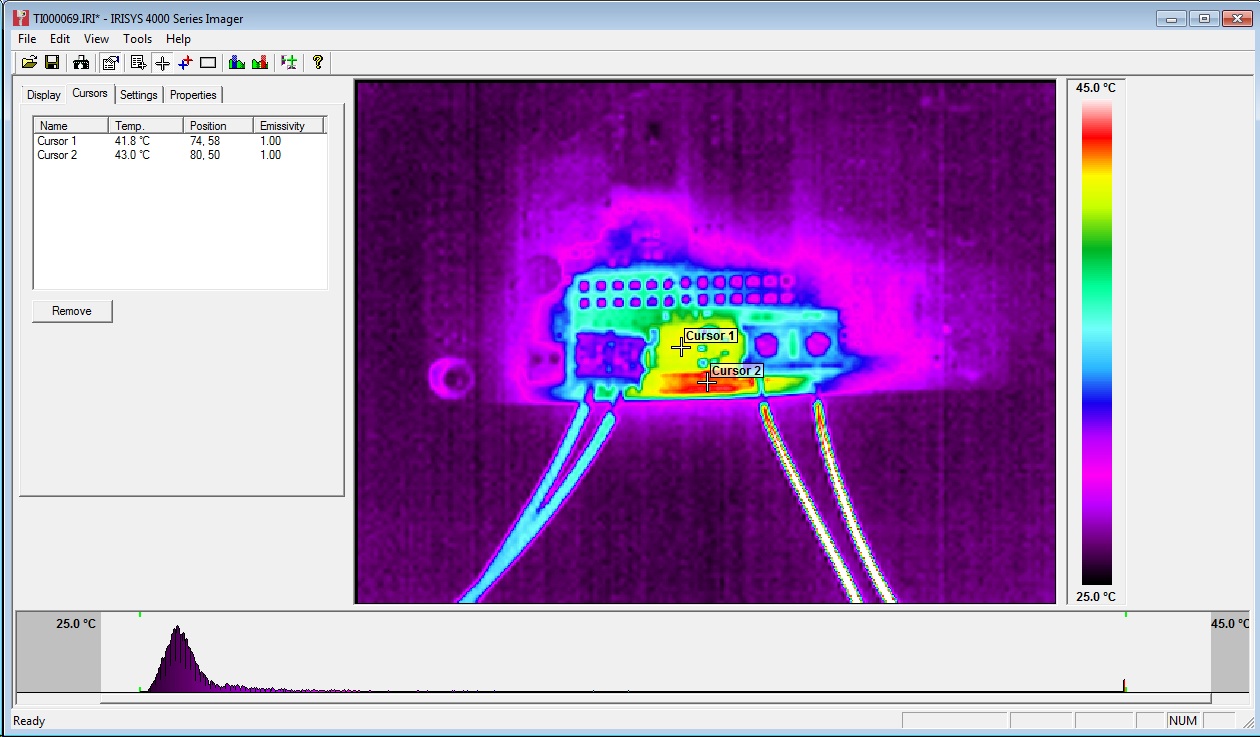
32mV at 10A = 3.2mOhm on resistance. As expected from datasheet.Temp measured at ~40C with thermal camera (ambient ~23C):


Track adjacent to FET (carrying input power) got marginally hotter, though nothing to worry about particularly but aim to increase track width on Duet v0.4.

A 20A load would give 1.28W dissipation. i.e. 4 times as much as 10A, therefore expect 50-60C temp rise on FET from ambient. FET rated to 175C.

PSU Testing

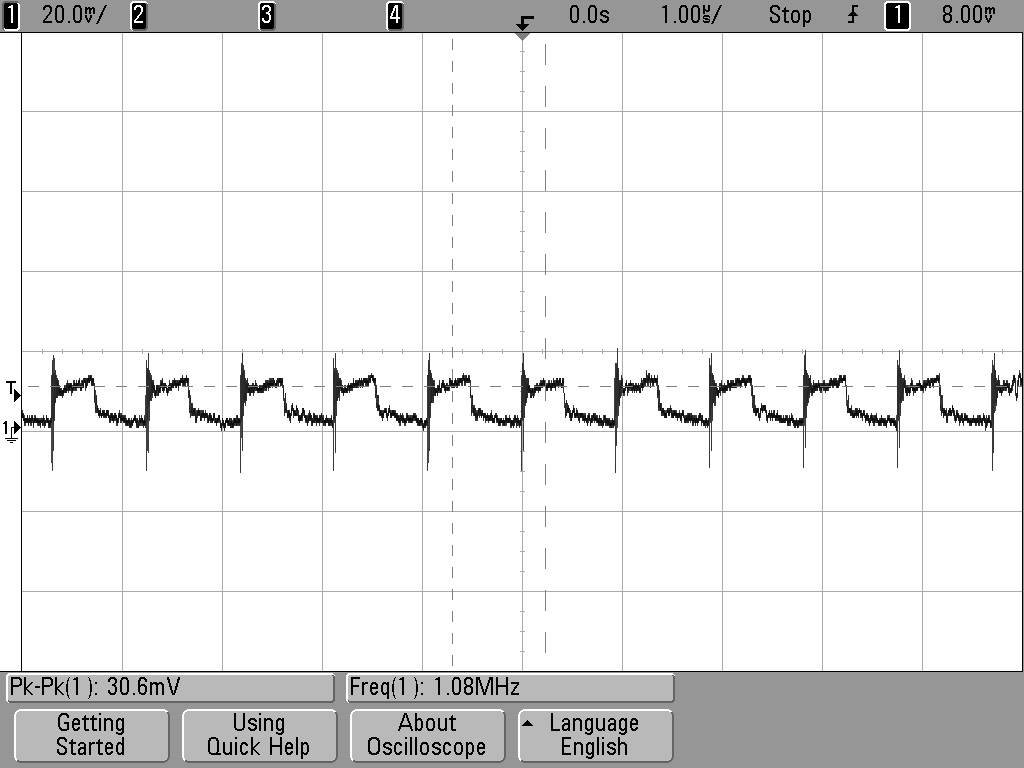
Perfectly happy at low loads (<750mA) (note the Arduino Due Power supply only dives a total of 800mA). 12-24V in, 4.98V out. Voltage ripple = ~30mVpk-pk (DC-20MHZ) See scope plot below:


Marginally unstable with 1A or greater load and Vin >16V.
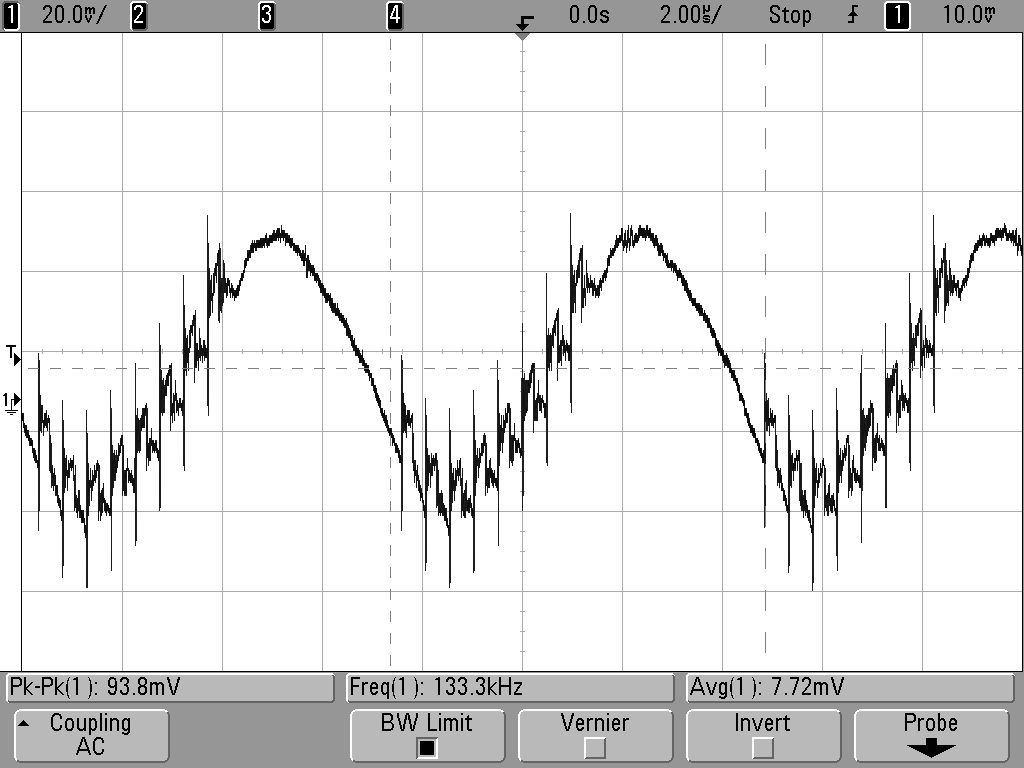
Voltage ripple = ~100mV (DC-20MHz). See scope plot below:


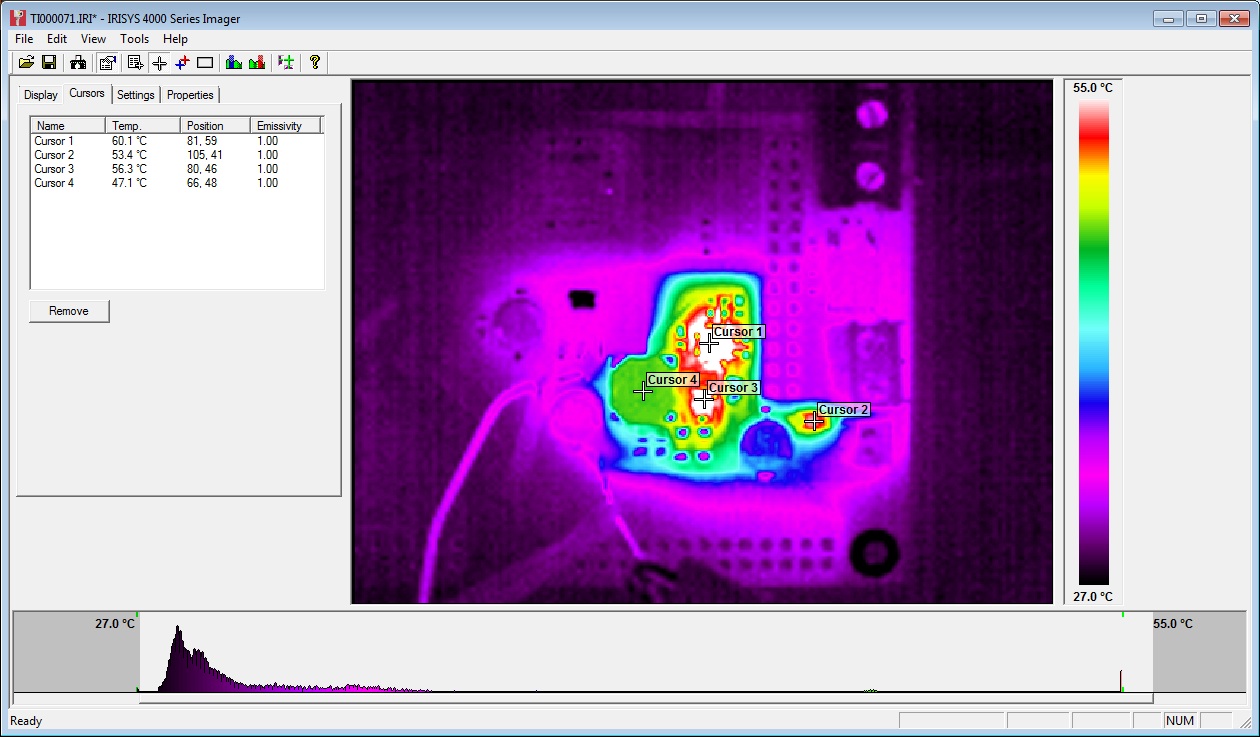
At 1A load, PWM IC temp = ~40C:


At 1.5A load, PWM IC temp = ~60C:


Further testing on 20/06/13:

Inductor L1 swapped from 22uH to 8.2uH. Tested 12V to 24V input and 0A to 1.5A output load.


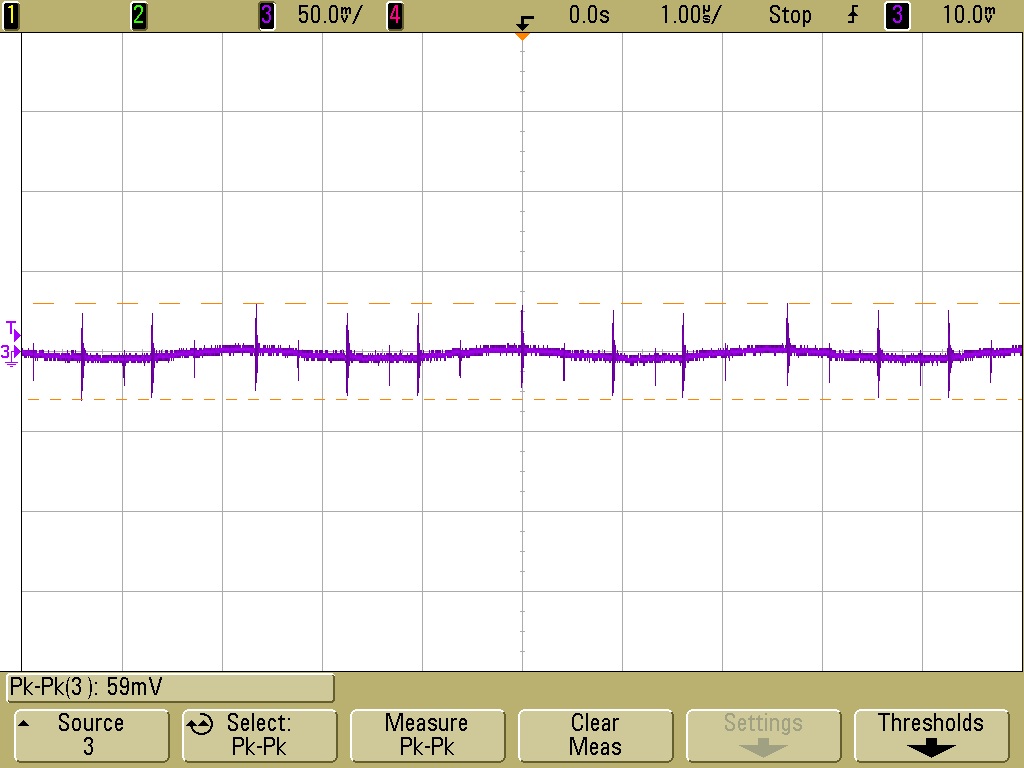
12V input, 1.5A load, voltage ripple+noise = ~60mVpk-pk (DC-20MHZ) See scope plot below:


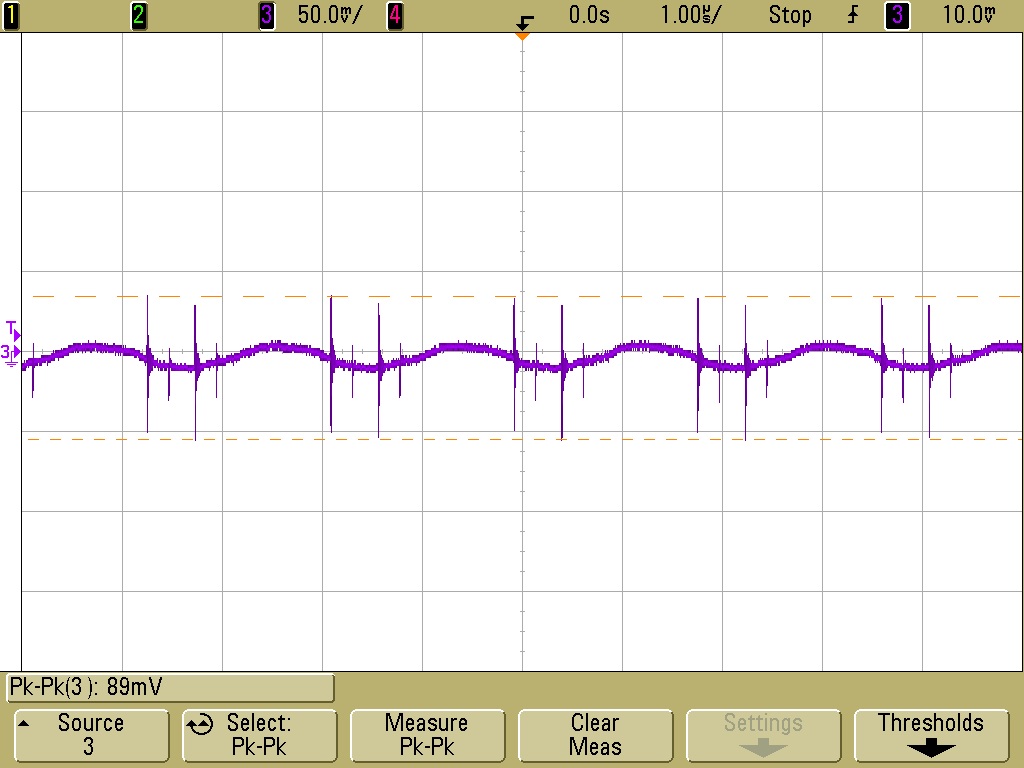
24V input, 1.5A load, voltage ripple+noise = ~90mVpk-pk (DC-20MHZ) See scope plot below:

Stepper Motor Testing

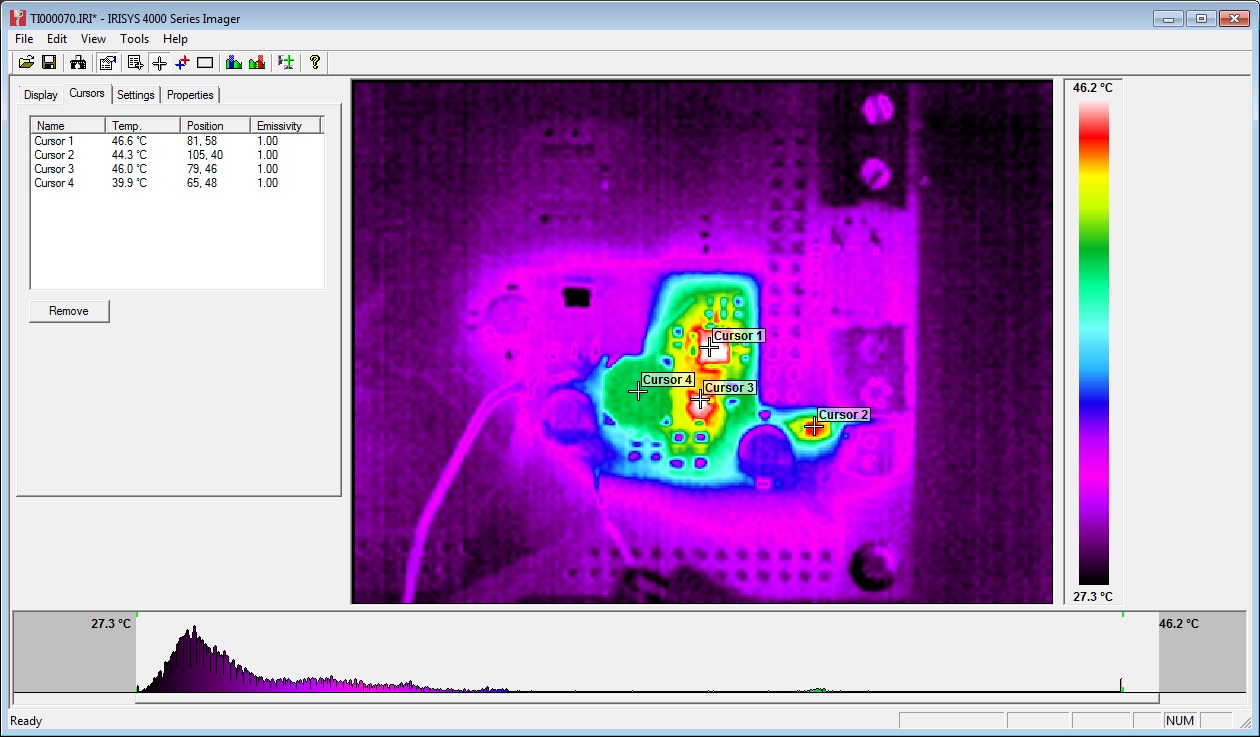
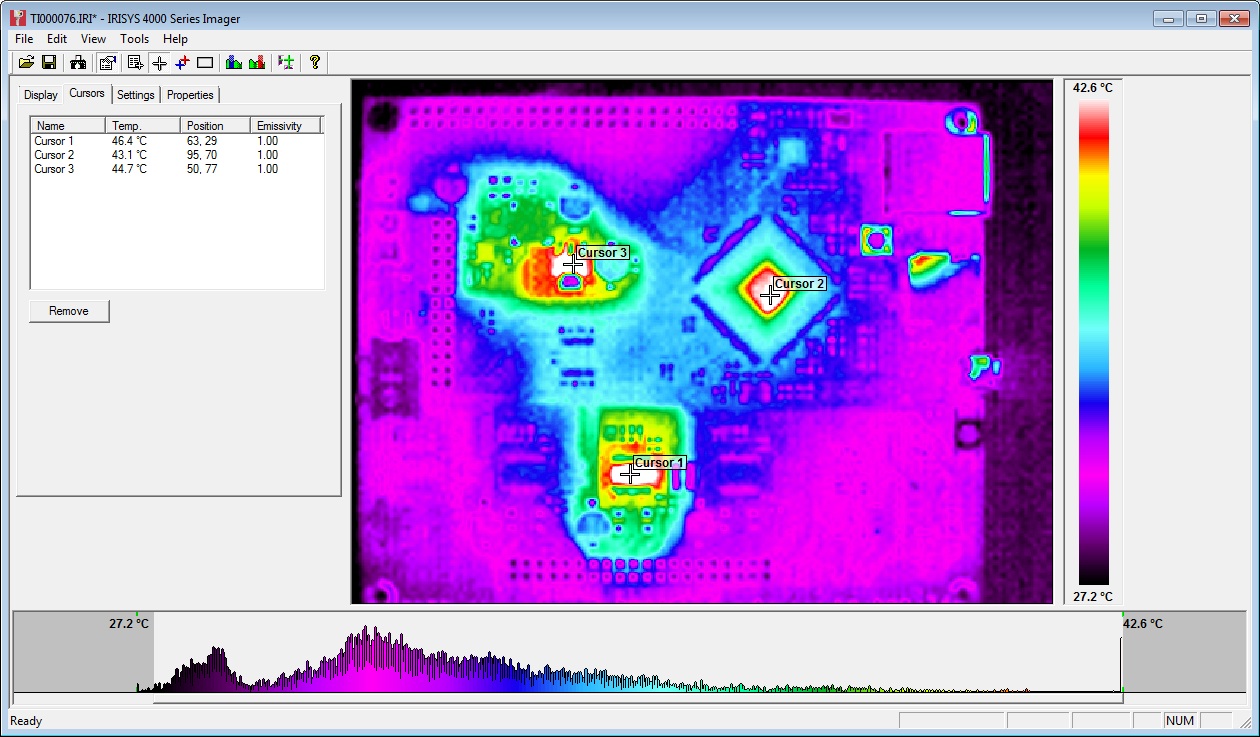
Initial testing completed using stepper.ino sketch. Timings changed to 10,000 for CW and 25,000 for CCW steps. An unloaded motor was run for 30mins with these step rates and then a thermal image was taken of Duet board. See below:


The three hot-spots seen in the image are the 3.3V regulator, the MCU and the stepper driver IC. All three showing temps of around 45C.

Note: Other random colourful spots are reflections off shiny surfaces - e.g. button switches and SD card slot. 

Afterward

The main point of posting this now is to inform the discussion on the RepRap forums about potential improvements to the Powersupply:

http://forums.reprap.org/read.php?340,285306

A great example of the benefits of releasing an open source design - really high quality feedback!