Thursday, 3 January 2013

I2C Port Expander & LCD working with Marlin

Previously...

The I2C port expander proved capable of driving a 20x4 LCD screen, reading the status of a quadrature encoder with click switch, driving some LEDs and a piezo buzzer.

Here is a quick video of this configuration working with Marlin firmware:


I had to make a few changes to marlin to make this happen which are detailed below.

Marlin Firmware integration

Lincomatic has forked Marlin and edited it to use his LiquidTWI2 library. This is a fast I2C LCD library designed for the adafruit RGB LCD shield, I added a couple of functions for this setup which Lincomatic has incorporated and updated the version number of LiquidTWI2 to 1.1.1. I used these as a start state as Lincomatic's version of Marlin was already proven with an I2C LCD -  all the line numbers below refer to this version.

The changes required are:

to configuration.h (line 292) add:

   #define PANELOLU2

   #ifdef PANELOLU2
   #define VERSAPANEL

   #define I2CENCODER //define this if you want to use the encoder over I2C
  #endif


This allows using the Panelolu2 with the encoder connected to either the port expander or directly to the main board.

to pins.h add (at line 657) :

  #ifdef ULTRA_LCD
    #ifdef NEWPANEL
      #define BEEPER -1

    #ifdef PANELOLU2
      #ifndef I2CENCODER
        #define BTN_EN1 10
        #define BTN_EN2 11 
        #define BTN_ENC 30  //the switch
      #endif
    #else
        //we have no buzzer installed
        #define BEEPER -1
        //LCD Pins
        #define LCD_PINS_RS        4
        #define LCD_PINS_ENABLE    17
        #define LCD_PINS_D4        30
        #define LCD_PINS_D5        29
        #define LCD_PINS_D6        28
        #define LCD_PINS_D7        27

        //The encoder and click button
        #define BTN_EN1 11
        #define BTN_EN2 10
        #define BTN_ENC 16  //the switch
      #endif //PANELOLU2

      //not connected to a pin
      #define SDCARDDETECT -1

      //from the same bit in the RAMPS Newpanel define
      //encoder rotation values
      #define encrot0 0
      #define encrot1 2
      #define encrot2 3
      #define encrot3 1
    
      #define BLEN_C 2
      #define BLEN_B 1
      #define BLEN_A 0

    #endif //Newpanel
  #endif //Ultipanel


to temperature.cpp replace

  #ifdef ULTIPANEL
    buttons_check();
  #endif

with (4 times at lines 956,980,1001,1022) :

  #ifdef ULTIPANEL
    #ifndef I2CENCODER
      buttons_check();
    #endif

  #endif

This is because Marlin uses a timer interrupt to run the temperature check code. Each time this interrupt runs, the status of the buttons on a Ultipanel-compatible controller are checked. If connected over I2C the encoder & click buttons cannot be checked within this interrupt routine as the Arduino wire library is blocking it. So we exclude this button check call and will check the encoder at another point.

On to ultralcd.pde. In the beep() and beepshort() functions replace

  //return;
  #ifdef ULTIPANEL

with (2 times at lines 189, 207) :
 
  //return;
  #ifdef PANELOLU2
     lcd.buzz(300,4000);
  #elif defined ULTIPANEL

This uses the buzzer on the port expander whenever beep() or beepshort() are called. Still in ultralcd.pde, in the lcd_status() function replace:

  #ifdef MCP23017_LCD
    if (lcd.readButtons() & BUTTON_SELECT)
      buttons |= EN_C;
  #endif


with (at line 225) :


  #ifdef MCP23017_LCD
    #ifndef I2CENCODER
      if (lcd.readButtons() & BUTTON_SELECT)
        buttons |= EN_C;
    #endif
  #endif


and


 //  buttons_check(); // Done in temperature interrupt

with (at line 252) :

  #ifdef I2CENCODER
    buttons_check(); //Done in temperature interrupt except if using I2C buttons
  #endif


As mentioned earlier Marlin uses the temperature check routine to call buttons_check() but as that is inside an interrupt routine we can't check it there - hence the check here.

Still within ultralcd.pde, the buttons_init() function has been edited so as not to throw errors if the buttons are not defined in pins.h (from line 281)


  #ifdef NEWPANEL
    #ifdef BTN_EN1
      pinMode(BTN_EN1,INPUT);
      WRITE(BTN_EN1,HIGH);
    #endif

    #ifdef BTN_EN2
      pinMode(BTN_EN2,INPUT);
      WRITE(BTN_EN2,HIGH);
    #endif

    #ifdef BTN_ENC
      pinMode(BTN_ENC,INPUT);
      WRITE(BTN_ENC,HIGH);
    #endif

    #if (SDCARDDETECT > -1)
    {
      pinMode(SDCARDDETECT,INPUT);
      WRITE(SDCARDDETECT,HIGH);
    }
    #endif

 
Still within ultralcd.pde the buttons_check() function has been edited to handle the different cases of an encoder connected via I2C or directly. The first part of the function was changed to the following (from line 310):


void buttons_check()
{
  uint8_t newbutton=0;
  #ifdef I2CENCODER
    uint8_t lrb = lcd.readButtons();
    if (lrb & ENCODER_A) newbutton |= EN_A;
    if (lrb & ENCODER_B) newbutton |= EN_B;
    if (lrb & ENCODER_C) newbutton |= EN_C;
  #elif defined(NEWPANEL)
    #ifdef BTN_EN1
      if(READ(BTN_EN1)==0)  newbutton|=EN_A;
    #endif

    #ifdef BTN_EN2
      if(READ(BTN_EN2)==0)  newbutton|=EN_B;
    #endif

    #ifdef BTN_ENC
      if((blocking<millis()) &&(READ(BTN_ENC)==0))
        newbutton|=EN_C;
    #endif     
    buttons=newbutton;


These changes allow for two configurations which can be switched between using the #define I2CENCODER within configuration.h :

with I2CENCODER defined:
  outputs (LCD, Buzzer, LEDs) use I2C
  inputs (Encoder with click switch) use I2C

with I2CENCODER not defined:
  outputs (LCD, Buzzer, LEDs) use I2C
  inputs (Encoder with click switch) are directly connected on the pins defined in pins.h

The reason I have included the option of directly connecting the encoder is because of the way marlin checks the buttons. Currently it's quite possible for encoder rotations to be lost if connected over I2C.


Next Steps

Since starting on this project Marlin has been updated to change how lcd displays are handled, splitting the menu system from the display implementation. There is currently a header file for the "standard" implementation using an LCD directly like the Panelolu. The obvious next step is to write a similar header file to use an I2C LCD using LiquidTWI2. In addition I need to add an option to use an interrupt on a pin to check the encoder status rather than a timer interrupt - this will ensure steps are not missed and the encoder can be safely used over I2C.

Tuesday, 18 December 2012

I2C port expander driving an LCD screen, click encoder and more

Adventures with the MCP23017 I2C port expander

Since working on the Panelolu I have been planning a project using the MCP23017 port expander. This chip gives 16 additional I/O ports which can be accessed using the I2C protocol, an easy to use bus communication protocol that is supported in the Arduino environment using the Wire library. My first exposure to I2C was during development of the Panelolu when I came across the Hobbytronics I2C LCD backpack, Adafruit also do a fancy 3 colour backlight LCD. I started this project in August but then put it on the back burner due to other commitments.

I re-invigorated the project recently as we get a lot of emails from people wanting to use the Panelolu with a Melzi or a Sanguinololu where pins on the expansion header are dedicated to other things. In both these cases the original Panelolu took too many pins. Added to this Nophead has announced he will be using Melzi on the Mendel90 which I feel is the best printer design out there right now.

Hardware setup.

The setup I have tested on uses a Sanguinololu but any similar reprap controller should work. The ISP header and 4 more pins are required:


Leaving 6 pins for other uses.

The circuit is setup as in the schematic


The Sanguinololu ISP and Expansion header pins are allocated as follows:
  • SCL and SDA are connected to pin 12 and 13 of the MCP23017
  • MOSI, MISO, SCK and A0 provide the SD card signals as they do in the Panelolu and SDSL.
  • A1 is the interrupt pin and I added an LED to this to help with debugging which is not illustrated in the schematic.
  • 5V and GND are distributed as required
from the MCP23017 the LCD display, Buzzer, Click Encoder and 3 LEDs are connected. There are 2 spare pins so further LEDS or something else could be connected.

Software Setup

I began testing in August with the library from Adafruit which does a great job of exposing the basic read and write functions of the expander. Recently Lincomatic updated the LiquidTWI2 library which extends the Adafruit library and I switched to that. It does not provide access to the interrupt functionality of the MCP23107 so I added some additional functions to the library:


//check registers
uint8_t LiquidTWI2::readRegister(uint8_t reg) {
  // read a register
  Wire.beginTransmission(MCP23017_ADDRESS | _i2cAddr);
  wiresend(reg);   
  Wire.endTransmission();
 
  Wire.requestFrom(MCP23017_ADDRESS | _i2cAddr, 1);
  return wirerecv();
}

//set registers

void LiquidTWI2::setRegister(uint8_t reg, uint8_t value) {
    Wire.beginTransmission(MCP23017_ADDRESS | _i2cAddr);
    wiresend(reg);
    wiresend(value);
    Wire.endTransmission();
}


In addition I added a function to switch the buzzer pin rapidly at a certain frequency to make a sound

//cycle the buzzer pin for a certain duration (ms) and at a certain freq (hz)
void LiquidTWI2::buzz(long duration, uint8_t freq) {
  int currentRegister = 0;
  // read gpio register
  Wire.beginTransmission(MCP23017_ADDRESS | _i2cAddr);
  wiresend(MCP23017_GPIOA);   
  Wire.endTransmission();
 
  Wire.requestFrom(MCP23017_ADDRESS | _i2cAddr, 1);
  currentRegister = wirerecv();
  duration *=1000; //convert from ms to us
  int period = (1.0 / freq) * 1000000; //*1000000 as the delay is in us
  long elapsed_time = 0;
  while (elapsed_time < duration)
  {
        Wire.beginTransmission(MCP23017_ADDRESS | _i2cAddr);
        wiresend(MCP23017_GPIOA);
        wiresend(currentRegister |= M17_BIT_BZ);
        while(Wire.endTransmission());
        delayMicroseconds(period / 2);
        Wire.beginTransmission(MCP23017_ADDRESS | _i2cAddr);
        wiresend(MCP23017_GPIOA);
        wiresend(currentRegister &= ~M17_BIT_BZ);
        while(Wire.endTransmission());
        elapsed_time += (period);
   }
}


I need to get up and running on GitHub until I do so the T3P3 version of LiquidTWI2 is available here. just download the as a zip and extract into the libraries subdirectory of the arduino folder so it looks something like:

C:\arduino-0023\libraries\LiquidTWI2\

At this time I have only tested it with Arduino 0023.

A1 is not a hardware interrupt pin so the PinChangeInt library for the Arduino is required. I used version 2.19, just download it according to the instructions and put in the libraries subdirectory of the arduino folder.

Example Sketch

I adapted the HelloWorld_i2c sketch that comes with LiquidTWI2, the full sketch is in the example sub directory of the T3P3 version of LiquidTWI. In essence the program uses the LiquidTWI2 library to setup communication with the MCP23017, configure and display information on the LCD and set the buzzer and LED pins.

It also sets interrupts on the click encoder pins and switch which trigger an interrupt on A1 every time the click encoder is turned or switch is pressed.

(from setup() )
...
    lcd.setRegister(MCP23017_GPINTENA,0x07); //enable interrupts on 3 pins
  lcd.setRegister(MCP23017_DEFVALA,0x07); //set the default values as 1

  //set to compare with register values set to 1 with DEFVALB 
  lcd.setRegister(MCP23017_INTCONA,0x07);
  lcd.setRegister(MCP23017_IOCONA,0x02); //enable active high for interrupt pin
  //read the interrupt capture register to reset it
  uint8_t reg = lcd.readRegister(MCP23017_INTCAPA);
  pinMode(interruptPin, INPUT); //set A1 (pin 30) as input

  //attach an interrupt using the pinChangeInt library to interruptPin
  PCintPort::attachInterrupt(interruptPin, &quickInt, RISING);

... 


The state of the click encoder and switch pins are are captured at the interrupt point and read, determining which way the encoder is turned or if the switch was pressed.

  void handleInterrupt() {
    //reset the flag
    rotating=false;  
    //get the interrupt status of the pins
    //this will clear the flag allowing further interrupts
    intCap=lcd.readRegister(MCP23017_INTCAPA);
    uint8_t test = intCap & 0b00000111;

    //only deal with the situation where the encoder is turned without the
    //click button held down
    if (test == 0b101) encoderPos += 1;
    if (test == 0b110) encoderPos -= 1;
    //mask out the encoder bits and look at the click button
    test &= 0b100;
    if (test == 0b000) clickButton = LOW;


    // while interrupts are still occurring clear the register (switch bouncing) 
    while(digitalRead(interruptPin) > 0)
    {
      
      lcd.readRegister(MCP23017_INTCAPA);
      delay (10);
    }
  }


The program does not make use of the SD card part of the design - that is planned for later when this is integrated into Marlin firmware. Also further testing on the buzzer is required as I believe the frequency is fairly limited by the I2C protocol and associated processing.

The video below demonstrated the example in operation.

Now off to make it work with Marlin firmware.


Thursday, 29 November 2012

Panelolu on RAMPS and PrintrBoard issues


Panelolu on RAMPS


Update: The Panelolu2 has replaced the Panelolu. It is much quicker to install, has adapter boards to no messing with cables and uses less pins. The blog post with the information is here, it is available to buy in our webshop.

The original idea for the Panelolu was based on the PanelMax which works with RAMPS. What I had not got around to doing was determining the changes needed to the pin mapping to cable for the Panelolu to work on RAMPS. Thankfully Ian Stratford has done the hard work and worked it all out.

Update: Ian has also made the Panelolu page on the reprap wiki - thanks!

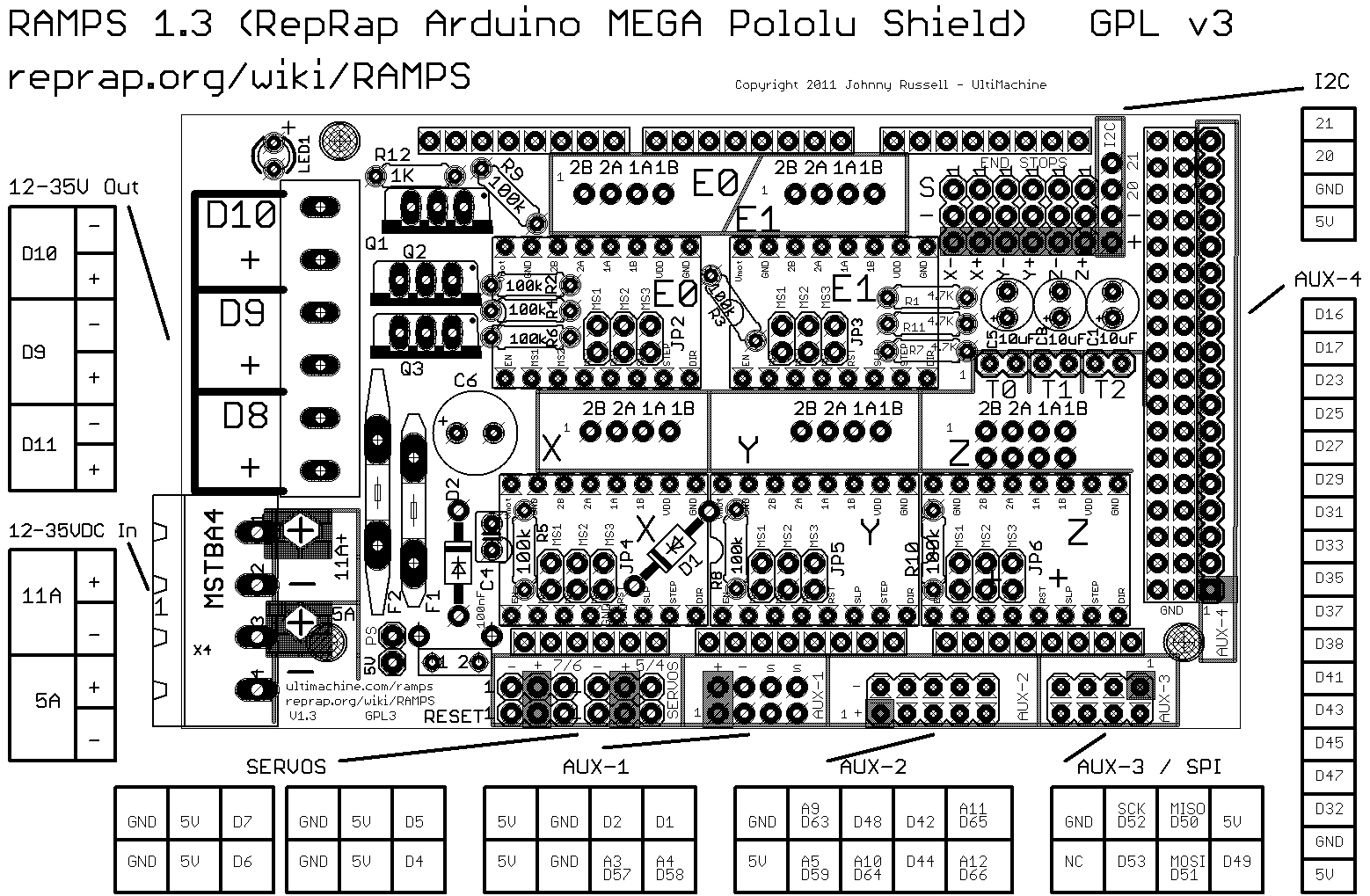
The tables below refer to the RAMPS pin outs from the reprap wiki - the picture is below


The tables below cover the differences between the RAMPS setup and the original instructions: Panelolu on Sanguinololu.

Ribbon Cable number
Function
Pin Sanguinololu
Pin RAMPS
1
GND
GND
NA
2
12V
12V
NA
3
LCD 1 (VSS - Ground)
LCD 5 (RW - Read/Write)
LCD 16 (K - Backlight Anode-)
Breadboard GND for encoder, switch, contrast, reset.
GND
GND (AUX-4)
4
LCD 2 (VDD +3.3 to +5v)
5V on breadboard, for brightness
5V
5V (AUX-4)
5
LCD 14 (DB7 - data bit)
A4
D29
6
LCD 4 (RS - register select)
PWM D12
D16
7
LCD 13 (DB6 - data bit)
A3
D27
8
Encoder1
TX1 D11
D35
9
LCD 12 (DB5 - data bit)
A2
D25
10
Encoder2
RX1 D10
D37
11
LCD 11 (DB4 - data bit)
A1
D23
12
LCD 6 (E - clock)
SDA D17
D17
13
SD (CS pin)
A0
D53
14
(via SDSL plug, NC) Encoder click
SCL D16
D31            
15
(via SDSL plug, NC)


16
(via SDSL plug, NC)


17
SD Ground
GND
GND
18
(via SDSL plug, NC) Reset
RST
No RST pin?
19
SD (DI pin)
MOSI
MOSI D51
20
SD (SCK pin)
SCK
SCK D52
21
SD 5V
5V
5V
22
SD (DO pin)
MISO
MISO D50
23
NA
NA

24
NA
NA


Other
LCD 3 (VO – contrast adjuster) to C on breadboard


Other
LCD 15 (A – Backlight Anode+) to B on breadboard (brightness)


RAMPS AUX-4
Ribbon Cable number
Function
Pin Sanguinololu
Pin RAMPS
6
LCD 4 RS (register select)
PWM D12
D16
12
LCD 6 E (clock)
SDA D17
D17
11
LCD 11 DB4
A1
D23
9
LCD 12 DB5
A2
D25
7
LCD 13 DB6
A3
D27
5
LCD 14 DB7
A4
D29
14
SD, encoder click
SCL D16
D31      

(Piezo Buzzer +)

D33
8
Encoder1
TX1 D11
D35
10
Encoder2
RX1 D10
D37
3
Ground
GND
GND
4
5V
5V
5V

RAMPS AUX-3 / SPI
Ribbon Cable number
Function
Pin Sanguinololu
Pin RAMPS
17
SD Ground
GND
GND

NC

NC
20
SD (SCK pin)
SCK
SCK D52
13
SD (CS pin)
A0
D53
22
SD (DO pin)
MISO
MISO D50
19
SD (DI pin)
MOSI
MOSI D51
21
SD 5V
5V
5V

NC

D49

To quote Ian
"I have managed to connect up the Panelolu kit to my RAMPS board with great success! Everything works except the reset button, as there is no reset pin on RAMPS. I added a piezo electric buzzer as well (from an old PC). Cabling is pretty straightforward, I just needed to trace the connection to the right pin. I built the Panelolu kit as per the Sanguinololu instructions, then used a couple of different sources to work out the correct pins on the RAMPS board. Then all I had to do was uncomment the #define ULTIPANEL line in Marlin. I did check the pins.h file, but it's already all in there for RAMPS. Worked first time!!"
Its now on my todo list to make up a cable to connect to RAMPS, something I intend to use on a dual extruder M90.

Printrboard issues

One of our customers, Bernardo, highlighted an issue with the Printrboard design: the Y-endstop is on the SS pin. Bernardo found the solution on Colin Bradburne's blog which I wont repeat here but if you are intending on using an SD card with Printrboard it is well worth reading his blog.